 PulseCheck
iPhone app, free
Free heart rate app for iPhone
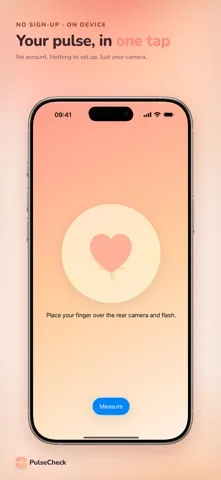
Rest a fingertip on the rear camera and flash, hold still for 15 seconds, and PulseCheck reads your pulse in beats per minute.

Free to download. No subscription and no in-app purchase. Rated 5.0 out of 5 from 1 rating on the App Store. Requires iOS 26 or later.
PulseCheck is a fitness and wellness app. It is not a medical device, it does not diagnose anything, and it is not a substitute for advice from a doctor. If something about your heart worries you, speak to a medical professional rather than to an app.
What a reading looks like
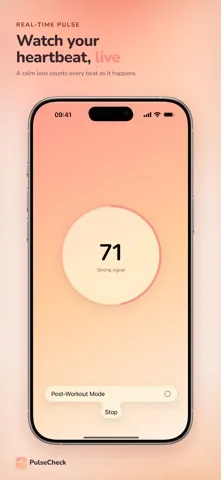
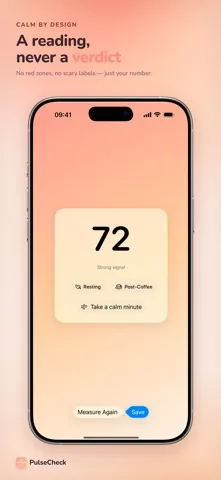
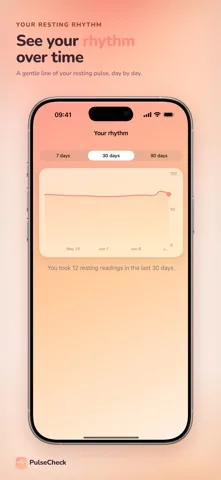
Four screens, start to finish. Nothing is hidden behind an upgrade.
How it works
- Cover the lens. Rest one fingertip over the rear camera and the flash. Firm enough that no daylight leaks in at the edges, gentle enough that you are not squeezing the blood out.
- Hold still for 15 seconds. The flash stays on, the camera watches the colour of your fingertip 30 times a second, and the accelerometer throws away the frames you moved through.
- Read the number and the label. Each beat pushes blood through your finger and changes that colour a little. PulseCheck counts those changes, turns the spacing between them into beats per minute, and tells you how clean the signal was.
Five things that make it different
Free, with no paywall over your number
There is no subscription, no in-app purchase and no upgrade screen between you and your reading. PulseCheck is paid for by ads instead: a banner, and now and then a full screen ad. Settings carries an ad privacy option so you can change what those ads are allowed to know.
15 seconds normally, 25 seconds after exercise
A standard reading runs for 15 seconds and shows a live number after about five. Post-Workout Mode runs for 25 seconds and tolerates twice as much hand movement, because nobody is steady straight after a run.
A signal label instead of a promise
Every reading is marked Strong signal, Moderate signal or Weak signal. When the signal is weak, PulseCheck gives you a range rather than one confident number. A camera reading depends on light, on finger pressure and on how still you sit, and the app admits that instead of hiding it.
Your readings stay on your iPhone
History lives on the device itself. There is no account, no server and nothing to sign up for. Swipe a reading away to delete it, export the lot as a CSV file from Settings, or switch on the optional write to Apple Health, which stays off until you turn it on and never reads anything back.
Tags, a trend and a home screen widget
Tag a reading Resting, Post-Coffee, Post-Exercise or Stressed, or write your own label. Once a tag has three readings and you have three resting ones to compare against, the app states plainly how far that tag sits from your resting average. A small widget shows your last reading, a medium one draws the recent ones, and a Live Activity keeps the count in the Dynamic Island while you measure.
Health & Fitness. Version 1.3.0. Free.
When people actually open it
The quiet morning reading
Before coffee, before getting up, tagged Resting so the trend line stays comparable. There is an optional morning reminder in Settings, off by default, set to 7:30 until you move it. How to take a resting reading that is worth comparing.
Straight after a run
Phone out, finger on the lens, Post-Workout Mode on. It is the case most camera apps handle worst, because their motion filter throws away everything you shook. Measuring your pulse after a workout.
No wearable in the house
No watch, no chest strap, no fingertip clip, and no wish to buy one for a number you check twice a week. Checking your heart rate without an Apple Watch.
Small private experiments
What the second espresso does. What a bad meeting does. Tag them, let a few readings collect, and the app compares each tag to your resting average without offering an opinion about it. When you want to come back down, Take a calm minute runs a breathing exercise of four seconds in and six seconds out, six times over.
What other people say
Being straight about it: PulseCheck is new. It holds 5.0 out of 5 from exactly 1 rating on the App Store. One rating is one person, so treat it as what it is, and judge the app on the screenshots above and on what this site says it does.
Guides
Frequently asked questions
Is there a free heart rate app for iPhone?
Yes. PulseCheck is free to download and free to use. There is no subscription and no in-app purchase, so nothing is held back behind an upgrade and no paywall appears between you and your reading. It is paid for by ads.
How does PulseCheck measure my pulse?
By photoplethysmography, usually shortened to PPG. Your fingertip covers the rear camera and the flash. Each heartbeat pushes blood through the tissue and changes how much light comes back, so the camera sees the colour of your finger brighten and dim 30 times a second. The app finds the peaks, measures the gaps between them, and turns the typical gap into beats per minute.
How accurate is a camera heart rate reading?
PulseCheck does not publish an accuracy figure, because it has not been validated against a clinical reference. Instead of a number it cannot back up, every reading carries a signal label, and a weak signal is shown as a range rather than a single value. A camera reading is a fitness reading. If you need a measurement you can rely on, use a device made and tested for that.
Is PulseCheck a medical device?
No. It is a fitness and wellness tool. It is not intended to diagnose, treat, cure, prevent or monitor any condition, it never labels a reading as abnormal, and it is not a substitute for seeing a doctor.
Do I need an Apple Watch or a chest strap?
No. The rear camera and flash of the iPhone are the sensor, so there is nothing to pair, charge or buy. Any iPhone running iOS 26 or later can take a reading on its own.
Can I measure my heart rate right after exercise?
Yes. Turn on Post-Workout Mode. It runs for 25 seconds instead of 15 and accepts roughly twice as much hand movement before it discards a frame, which is what makes a reading possible while you are still catching your breath.
Where do my readings go?
They stay on your iPhone. There is no account and no server behind the app. You can delete a reading by swiping it away, export the whole history as a CSV file from Settings, and optionally have each saved reading written to Apple Health. That switch is off by default, and PulseCheck only writes to Health, never reads from it.
How much does PulseCheck cost?
Nothing. It is free to download, free to use, and there is no in-app purchase or subscription to buy. Ads pay for it, so you will see a banner and occasionally a full screen ad, and iOS may ask you whether the app is allowed to track you. That answer is yours and you can change it in Settings.
Which iPhones does PulseCheck run on?
Any iPhone with iOS 26 or later, since it is built on the iOS 26 design system. It needs the rear camera and the flash, which is why measurements are taken on the back of the phone rather than the front.
Still a fitness and wellness app, and still not a medical device.